Your POS, Your Inventory,
Your Accounts —
All Talking to Each Other in Real Time.
Retail POS connected live to inventory, accounting, and CRM — multi-location support, loyalty programmes, offline capability, and AI-powered stock management — configured specifically for retail businesses across UAE, UK, Australia, and India.
Retail success is built on three things — product availability, customer experience, and margin visibility. Your POS system either supports all three or undermines all three.
Retail businesses run on speed and accuracy simultaneously. A customer at the counter expects a fast, seamless transaction. Your operations team needs that transaction to update inventory, post to accounting, and contribute to management reporting — instantly, without manual reconciliation at end of day.
The retailers that run profitably share one operational characteristic: their POS system is not an island. Every sale updates inventory in real time. Every payment posts to accounting automatically. Every customer transaction builds a profile that informs restocking, loyalty, and marketing decisions.
The POS terminal is the front end of a connected operational system.
It's not a standalone cash register that needs to be reconciled with everything else manually. The moment a transaction is completed, the entire business knows about it.
Most retail businesses are trapped in silos.
They either run a standalone POS that needs manual sync with inventory and accounting, or they run POS-specific software that can't connect to their ERP without a costly integration layer. Both create the same problem: operational data trapped in silos, reconciliation consuming hours, and management decisions made on yesterday's data at best.
Rootlevel configures Odoo POS as the front end of a fully connected retail operation — so every sale is immediately visible everywhere it needs to be.
Eight ways a disconnected POS system costs a retail business real money.
End-of-day stock reconciliation consuming hours
POS sales recorded in one system. Inventory managed in another. Every end of day requires manual reconciliation — matching POS sales to inventory movements, identifying discrepancies, updating stock counts manually. Hours consumed on work the system should do automatically.
Stock levels wrong between POS and warehouse
POS terminal shows a product as available. The warehouse system shows it as out of stock — or vice versa. Staff can't trust either system. Manual stock checks happen before every customer query. Customer-facing stock accuracy is a guess.
Cash and card reconciliation manual
Cash drawer counted manually at end of shift. Card terminal totals compared manually to POS totals. Discrepancies investigated manually. The accounting system updated manually from the POS report. End-of-day close takes an hour that should take five minutes.
Multi-location stock invisible
A customer asks if a product is available at another branch. The staff member doesn't know — there's no system visibility into other locations' stock. The customer leaves. The sale is lost because the system couldn't answer a basic question.
No customer purchase history at the counter
A loyal customer asks about their previous purchase. The staff member has no record. Loyalty points calculated manually or not at all. Customer birthdays, preferences, and purchase patterns invisible to the sales team.
Promotions and discounts applied inconsistently
Promotional pricing set up in the POS but not connected to the inventory system's pricing. Discounts applied manually by staff — inconsistently, generously, or not at all depending on who's at the counter. Promotion performance impossible to measure accurately.
Accounting entries created manually from POS reports
End-of-day POS report printed. Accounting entries created manually in the accounting system. Sales by payment method, tax collected, and till float all entered manually. Errors introduced at every step. Month-end accounting takes longer than it should.
Replenishment decisions made on stale data
Buying decisions for retail stock made from weekly or monthly stock reports — not from real-time sales velocity data. Fast-moving products run out before the next order arrives. Slow-moving products accumulate and tie up cash.
Every Odoo POS capability — configured for a connected retail operation.
Odoo POS — Full Configuration
Odoo Point of Sale configured for your retail operation — product catalogue loaded, pricing rules configured, payment methods set up, receipt templates branded, and staff access rights defined. Fast, reliable, and intuitive.
Product catalogue configuration, barcode scanning setup, payment method configuration (cash, card, voucher, split payment), receipt branding, tax configuration, staff PIN login, shift management.
Live Inventory Connection
Every POS sale immediately updates inventory in real time — no end-of-day sync, no manual reconciliation. Stock levels visible at the POS counter reflect actual available stock.
Real-time inventory deduction on sale, stock availability at POS, low stock alerts at counter, multi-location stock visibility, inter-branch stock transfer from POS.
Automated Accounting Integration
Every POS session — sales, returns, discounts, payment methods, tax collected, and till movements — posted to Odoo accounting automatically when the session is closed. No manual journal entries.
Automated session journal entries, payment method accounting, tax posting, cash drawer reconciliation, discount accounting, return and credit note posting.
Multi-Location Retail Management
Multiple retail locations managed from a single Odoo backend — each with its own POS terminal, its own inventory, its own cash management, and its own staff. Consolidated reporting across all locations.
Multi-location POS configuration, location-specific inventory, inter-location stock transfer, consolidated multi-location reporting, location-level P&L.
Customer & Loyalty Management
Customer identification at the POS — lookup by name, phone, or loyalty card. Purchase history visible at the counter. Loyalty points calculated and applied automatically on every transaction.
Customer lookup at POS, loyalty programme configuration, points calculation and redemption, birthday promotion automation, customer purchase history, CRM integration.
Promotions & Discount Management
Promotional pricing configured centrally and applied automatically at the POS — no manual discount entry, no inconsistency between staff members, no promotion that runs longer than intended.
Time-limited promotion configuration, product-specific discount rules, customer tier discounts, promotional performance reporting, discount approval workflows for large discounts.
Offline Capability
Odoo POS continues operating when internet connectivity is lost — transactions processed locally, receipts printed, and payment recorded. When connectivity is restored, all offline transactions sync automatically to the backend.
Offline mode configuration, local transaction storage, automatic sync on reconnection, offline payment handling, connectivity status indicator.
Retail Intelligence & Reporting
Real-time retail performance dashboards — sales by hour, by product, by staff member, by payment method, by location. Best-selling products, slow movers, and margin by product all reportable instantly.
Real-time sales dashboard, hourly sales analysis, product performance reports, staff performance reports, payment method analysis, margin reporting, scheduled report delivery.
Where AI and automation create the most value in a retail operation.
AI-Powered Stock Replenishment
AI analyses POS sales velocity, day-of-week patterns, seasonal trends, and current stock levels to generate intelligent replenishment suggestions — telling your buying team what to order, how much, and when.
Automated Customer Engagement
Post-purchase thank you messages, loyalty point balance updates, birthday offers, and win-back campaigns for lapsed customers — all triggered automatically from Odoo CRM based on real transaction data.
Low Stock Alerts at POS
Automated alerts when a product at a POS location falls below a configurable threshold — notifying the right person to initiate a replenishment transfer from the warehouse or from another location.
End-of-Day Accounting Automation
POS session close triggers automatic accounting entries — sales posted by category, tax collected posted to liability accounts, payment methods reconciled. End-of-day accounting is a review exercise, not data entry.
Automated Retail Performance Reporting
Daily sales summary, weekly margin report, and monthly location performance comparison delivered automatically to the right people without manual assembly. Managers start every day with yesterday's complete data.
AI Customer Segmentation
AI segments your retail customer base by purchase frequency, average transaction value, product preferences, and recency — identifying your VIP customers, at-risk customers, and best candidates for targeted promotions.
Odoo POS works best for retailers who need their counter operations connected to their business operations.
Right for you if:
- You operate one or more retail locations and need POS connected to inventory and accounting
- Your current POS is a standalone system that requires manual reconciliation with your ERP
- You manage stock across multiple retail locations and need visibility from one system
- You want a loyalty programme connected to real purchase history — not a standalone card system
- You're based in UAE, UK, Australia, or India and need local tax compliance at the POS
- You want AI-powered stock replenishment driven by POS sales velocity
- You need offline POS capability for locations with unreliable connectivity
Probably not right if:
- You're a pure eCommerce business with no physical retail locations
- You want a POS configured without connecting it to inventory and accounting — the connection is the value
- You're looking for a hospitality POS for restaurants or cafés — Odoo POS is optimised for retail, not F&B service
Heavy POS customisation for a Belgian EV and motorcycle retailer — Studio-native, migration-proof, connected to inventory and eCommerce.
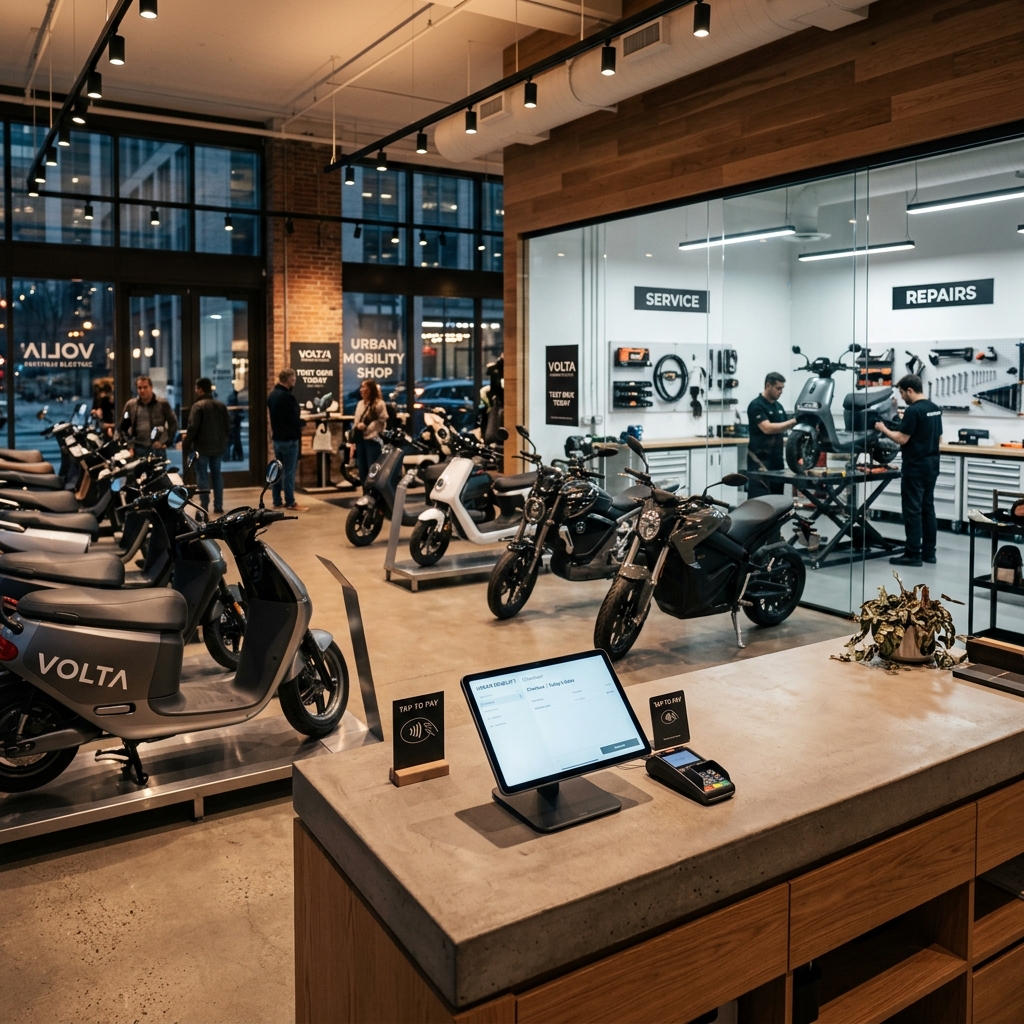
Retail & Urban Mobility — Belgium
Specialised scooter, motorcycle & light EV retailer — one-stop urban mobility shop with retail POS, workshop servicing, and eCommerce — Odoo Online
A Belgian EV and motorcycle retailer needed their Odoo POS heavily customised for their specific retail operation — serialised vehicle inventory tracked through POS sales, accessories and apparel managed by lot, eCommerce category hierarchy connected to POS product catalogue, and multi-company branding conflicts resolved across the POS receipt and customer communications.
We built the full POS configuration Studio-native — no custom Python, all within Odoo Online constraints — connected to serialised inventory, fleet management, and eCommerce. Migration-proof across V17, V18, and V19.
Results
- POS connected live to serialised vehicle inventory
- eCommerce and POS product catalogue aligned
- Multi-company branding correct across all POS receipts
- 95% migration-proof across 3 version upgrades
The tools behind our solutions.
What retail businesses ask before starting with Odoo POS.
Running a retail business — and your POS isn't connected to your inventory and accounting the way it should be?
Manual end-of-day reconciliation, stock levels you can't trust, and accounting entries created from POS reports are all fixable. We've solved all three for retail businesses across UAE, UK, Australia, and India.